
-
Getting Started
-
Garmin Devices
- Garmin Device Firmware Guide
- Check Garmin Device Firmware
- Set up and Connect Garmin Index2 Scale
- Screen Control on Garmin Wearables
- How to charge Garmin devices best
- Wearable and Device ID Management
- Setup: Prepare Wearable Devices
- Compatible Garmin Devices
- Garmin Timezone & Time
- Wifi Capabilities and Restrictions of Garmin Devices
-
Setup
-
Manage
-
Data Collection
- Collect Data: Synchronization Types
- Collect Data: Tablet Sync (multi-sync) with "Fitrockr Hub (Multi-Sync)" app
- Collect Data: Smartphone Sync (single-sync) with Garmin Connect app
- Collect Data: Overview
- Collect Data: Smartphone Sync (single-sync) with Fitrockr app
- Collect Data: Sync via USB cable to Laptop
- Collect Data: Smartphone Sync (single-sync) with Omron Blood Pressure Monitors
- Apple Health and Google Health Connect
- Withings
- Wifi Capabilities and Restrictions of Garmin Devices
- Wearable Sync Methods and Frequencies
- Samsung Health
- Oura
-
Track
-
Analyze
-
Other
-
Trouble Shooting
-
Definitions
-
FAQ
- How to use HR monitor strap
- What happens when a Garmin device runs full?
- How to read Accelerometer json output file
- How to get access to Dexcom data
- Which Garmin devices support Wifi sync
- How to free up and reclaim licenses
- How to do a complete data export
- How to enable notifications on the wearable
- Why are some values longer than the given timeframe
-
Blog
Analyze: Share
The Share feature is available at selected data reports such as Analytics Studio, 6 Minute Walk Test and Activities. This feature allows admins to securely share specific sets of data with external stakeholders — without requiring them to log in.
A public, shareable link provides view-only access to a defined dataset of a report. This can easily be shared with healthcare staff, doctors, or research partners.
Conduct the following steps to set up a shareable link:
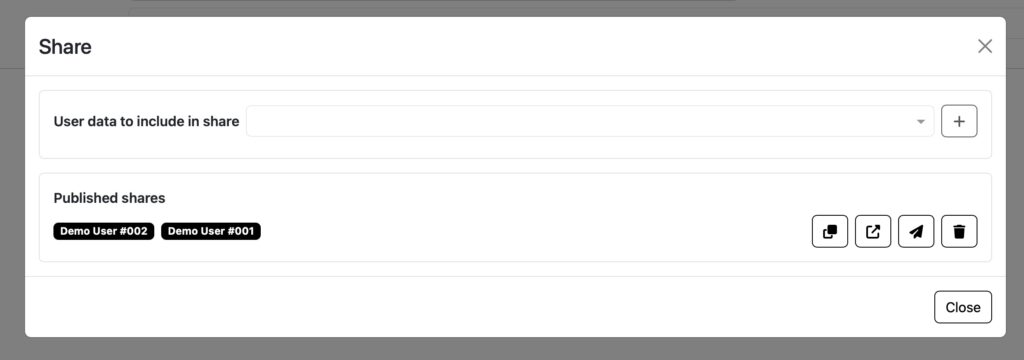
(1) in the feature navigation, click on “Share”
(2) select user data to be included in the public link at “User data to include in share”
(3) click + to generate a public link that contains data of the selected users
(4) under “Published shares” you can see all public links available
(5) use the icon features to share public links:
▶︎ Copy: copy link to clipboard.
▶︎ Open: open link.
▶︎ Send email: sends an email with the public link to each user included in the share.
▶︎ Remove: removes public link. Data can no longer be accessed with the link.
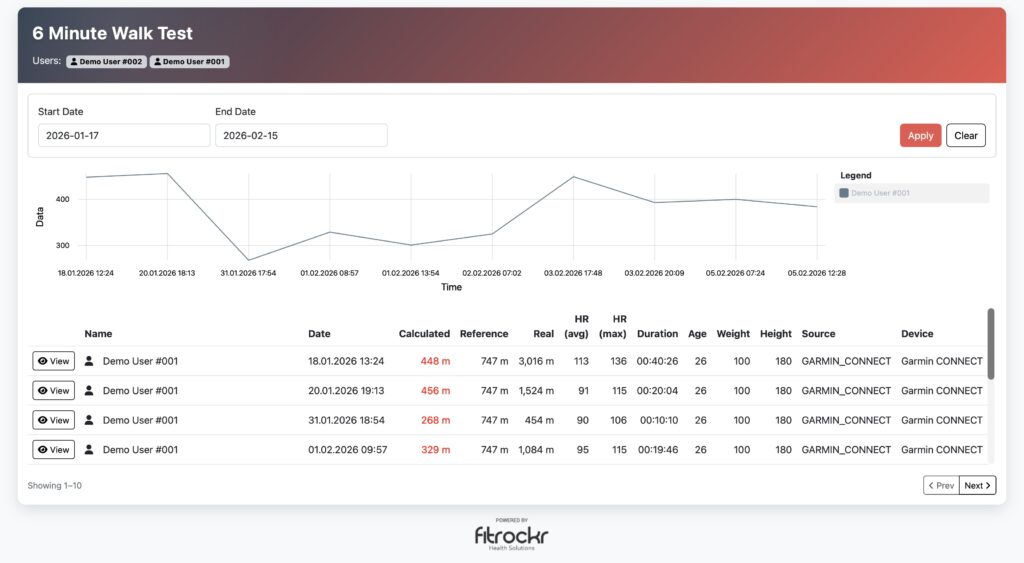
Important: be careful when using the share functionality!
▶︎ Shared links provide public access to all user data included.
▶︎ Anyone with access to a link can access the data without a login.
▶︎ Instruct users to share links only with trusted recipients (e.g., trusted physician).
▶︎ Always test each link yourself to confirm it includes only the intended users before distributing it.
▶︎ Use pseudonymized user names (e.g., User 001) to prevent re-identification of individual data.