
-
Getting Started
-
Garmin Devices
- Garmin Device Firmware Guide
- Check Garmin Device Firmware
- Set up and Connect Garmin Index2 Scale
- Screen Control on Garmin Wearables
- How to charge Garmin devices best
- Wearable and Device ID Management
- Setup: Prepare Wearable Devices
- Compatible Garmin Devices
- Garmin Timezone & Time
- Wifi Capabilities and Restrictions of Garmin Devices
-
Setup
-
Manage
-
Data Collection
- Collect Data: Synchronization Types
- Collect Data: Tablet Sync (multi-sync) with "Fitrockr Hub (Multi-Sync)" app
- Collect Data: Smartphone Sync (single-sync) with Garmin Connect app
- Collect Data: Overview
- Collect Data: Smartphone Sync (single-sync) with Fitrockr app
- Collect Data: Sync via USB cable to Laptop
- Collect Data: Smartphone Sync (single-sync) with Omron Blood Pressure Monitors
- Apple Health and Google Health Connect
- Withings
- Wifi Capabilities and Restrictions of Garmin Devices
- Wearable Sync Methods and Frequencies
- Samsung Health
- Oura
- Polar
- Collect Data: Menstrual Cycle Tracking
-
Track
-
Analyze
- Analyze: Overview
- Analyze: Data Export
- Analyze: Standard Reports
- Analyze: Sleep Analysis
- Analyze: Vitality Report
- Analyze: 6 Minute Walk Test
- Analyze: Body Battery
- Analyze: HRV
- Analyze: Activities
- Analyze: Live Streaming
- Analyze: Analytics Studio
- Analyze: Share
- Setup: Onboarding & First Steps
- Analyze: Data Export (Accelerometer & Gyroscope)
-
Other
-
Trouble Shooting
-
Definitions
-
FAQ
- How to use HR monitor strap
- What happens when a Garmin device runs full?
- How to read Accelerometer json output file
- How to get access to Dexcom data
- Which Garmin devices support Wifi sync
- How to free up and reclaim licenses
- How to do a complete data export
- How to enable notifications on the wearable
- Why are some values longer than the given timeframe
- How to pair the Garmin Index Sleep Monitor
- How to get GPS data
-
Blog
Menstrual Cycle Tracking
Menstrual Cycle Tracking (MCT) is fully supported by the Fitrockr platform.
The MCT data collection method differs depending on whether a wearable is used and if yes, which type of wearable (e.g. Garmin, Oura, or Fitbit). Some wearables provide built-in menstrual cycle tracking such as Garmin Connect. If you sync a Garmin device via Garmin Connect, MCT data will automatically be available in Fitrockr. If you sync Garmin devices via the Fitrockr Sync app or if you sync other wearables such as Withings, Polar or Fitbit, MCT data will be collected directly via the Fitrockr app and not via the wearable app. This has a lot of benefits as MCT data can be fully configurable to your needs if tracked via the Fitrockr app.
To collect MCT data via the Fitrockr app, follow these steps:
1. Go to SETUP > DATA STUDIO
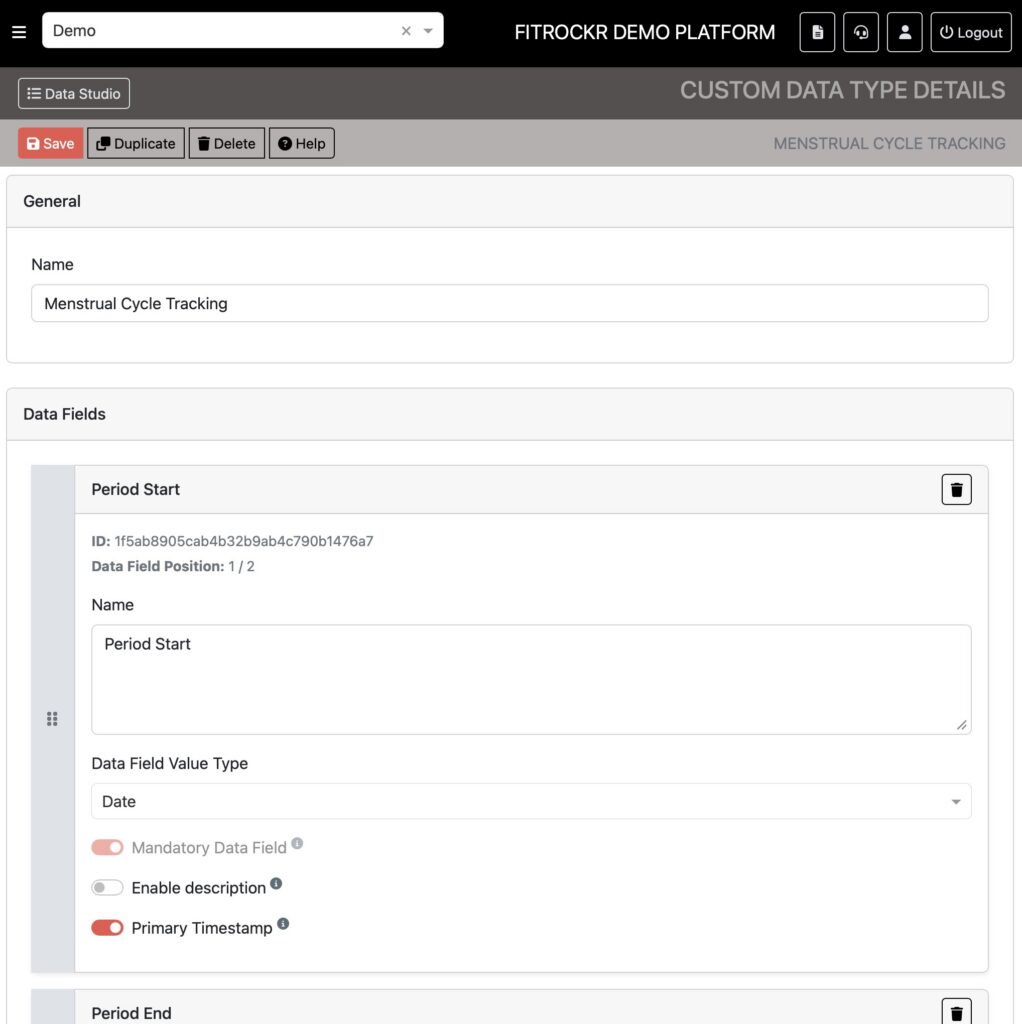
2. Create the Menstrual Cycle Tracking data type
3. Configure the data that you would like to collect
4. Save the data type
5. Go to SETUP > PROJECT and edit the project
6. Scroll down to the FITROCKR APP SETTINGS section > DISPLAY OPTIONS and enable “Show Self-Reporting Data” and select your Menstrual Cycle Tracking data type. This will enable if in the Fitrockr app for self-reporting.
Best Practice
Create two data types:
(1) MCT – Period Tracking
Use this data type to let women report period length. To do so, create two fields:
▶︎ Period Start (date field – mandatory – primary timestamp)
▶︎ Period End (date field – optional)
Setting the period end date to optional allows women to create an entry at the start of the period. Once the period ends, they can modify the entry to add an end date.
(2) MCT – Symptoms Tracking
Use this data type to let women report symptoms. To do so, create the following fields:
▶︎ Symptoms Date (date field – mandatory – primary timestamp)
▶︎ Flow (single choice field – optional)
Choices: [Light | Medium | Heavy]
▶︎ Physical Symptoms (multiple choice field – optional)
Choices: [Acne | Backache | Bloating | Nausea | Body Aches | Constipation | Cramps | Tender Breasts | Diarrhea | Fatigue | Headache | Trouble Sleeping]
▶︎ Other Symptoms (text field – optional)
▶︎ Mood (multiple choice field – optional)
Choices: [Fine | Happy | Energetic | Motivated | Mood Swings | Sad | Emotional | Overwhelmed | Irritable | Frustrated]
▶︎ Discharge [No Discharge | Creamy | EggWhite | Spotting | Sticky | Unusual]
▶︎ Ovulation (single choice field – optional)
Choices: [No | Yes]
The following questions could be included in a baseline questionnaire:
▶︎ Sexual Activity (single choice field – optional)
Choices: [Protected | Unprotected]
▶︎ Reproductive Health (single choice field – optional)
Choices: [Contraception | Menopause | Postpartum]
▶︎ Pregnancy Status (single choice field – optional)
Choices [No pregnant | Pregnant]