
-
Getting Started
-
Wearable
- Garmin Device Firmware Guide
- Check Garmin Device Firmware
- Set up and Connect Garmin Index2 Scale
- Screen Control on Garmin Wearables
- How to charge Garmin devices best
- Wearable and Device ID Management
- Setup: Prepare Wearable Devices
- Compatible Garmin Devices
- Garmin Timezone & Time
- Wifi Capabilities and Restrictions of Garmin Devices
- Screenless bands for blinded data collection
-
Setup
-
Manage
-
Data Collection
- Collect Data: Synchronization Types
- Collect Data: Tablet Sync (multi-sync) with "Fitrockr Hub (Multi-Sync)" app
- Collect Data: Smartphone Sync (single-sync) with Garmin Connect app
- Collect Data: Overview
- Collect Data: Smartphone Sync (single-sync) with Fitrockr app
- Collect Data: Sync via USB cable to Laptop
- Collect Data: Smartphone Sync (single-sync) with Omron Blood Pressure Monitors
- Apple Health and Google Health Connect
- Withings
- Wifi Capabilities and Restrictions of Garmin Devices
- Wearable Sync Methods and Frequencies
- Samsung Health
- Oura
- Polar
- Collect Data: Menstrual Cycle Tracking
- Screenless bands for blinded data collection
- Show all articles (1) Collapse Articles
-
Track
-
Analyze
- Analyze: Overview
- Analyze: Data Export
- Analyze: Standard Reports
- Analyze: Sleep Analysis
- Analyze: Vitality Report
- Analyze: 6 Minute Walk Test
- Analyze: Body Battery
- Analyze: HRV
- Analyze: Activities
- Analyze: Live Streaming
- Analyze: Analytics Studio
- Analyze: Share
- Setup: Onboarding & First Steps
- Analyze: Data Export (Accelerometer & Gyroscope)
- Setup: Accelerometer & Gyroscope Data Collection
- Analyze: Health Advisory
- Analyze: Drowsiness Detection
- Show all articles (2) Collapse Articles
-
Other
-
Trouble Shooting
-
Definitions
-
FAQ
- How to use HR monitor strap
- What happens when a Garmin device runs full?
- How to read Accelerometer json output file
- How to get access to Dexcom data
- Which Garmin devices support Wifi sync
- How to free up and reclaim licenses
- How to do a complete data export
- How to enable notifications on the wearable
- Why are some values longer than the given timeframe
- How to pair the Garmin Index Sleep Monitor
- How to get GPS data
- How to check if background sync is enabled
- What does influence sleep measurement and recording
- Why do HR and BBI measurements not fully align?
- What apps are needed to use Fitrockr?
- How to pair and operate the screen-free Garmin CIRQA band?
- Is the Garmin CIRQA band suitable for raw accelerometer signal data collection?
- What data is stored and processed at a Fitness Challenge?
- Show all articles (3) Collapse Articles
-
Blog
Is the Garmin CIRQA band suitable for raw accelerometer signal data collection?
The screenless Garmin CIRQA band is perfectly designed for blinded data collections where it is important that participants do not get distracted or change their behaviour. It also excels in data coverage by supporting a vast amount of data types such as steps, sleep, workouts, heart rate, beat-to-beat-interval, skin temperature and many more.
We have asked ourselves if its 3-axis accelerometer can also be leveraged for collecting raw motion signal data.
This article describes our findings. In a nutshell: yes it can be used but there are some limitations to consider.
Test Setup
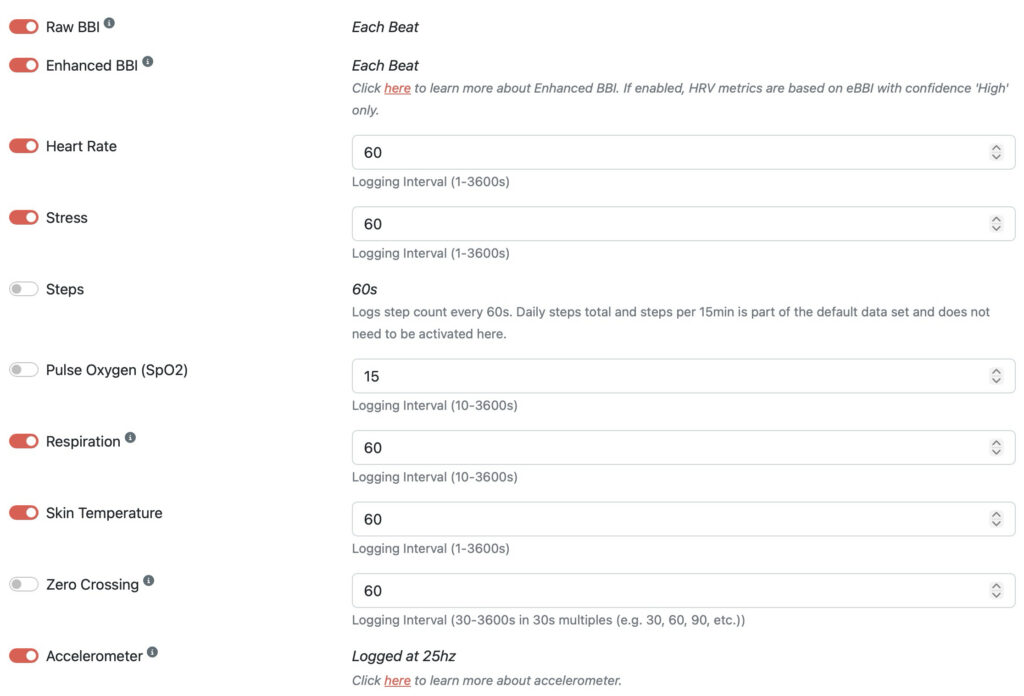
In our test, we have configured the following data collection profile in Fitrockr:
- Standard data (default setting)
- Raw & Enhanced BBI
- Heart Rate at 60s
- Stress at 60s
- Respiration at 60s
- Skin Temperature at 60s
- Accelerometer at 25Hz
Storage
The Garmin CIRQA band comes with a storage capacity of 128MB. A heavy data collection profile that includes accelerometer can generate up to 100MB of data per week. This means that the CIRQA bands should be synchronized with the Fitrockr platform weekly to avoid data overwrite/loss.
The Fitrockr synchronization can either be done via USB-cable to a laptop (recommended sync method) or via Bluetooth to a smartphone. Due to the high amount of accelerometer data, Bluetooth sync needs to be performed multiple times per day which will be automatically conducted by the Fitrockr mobile app. The important aspect here is that the smartphone needs to be in close range throughout the day to allow continuous background syncs. If this is not the case, Bluetooth protocol can be become overload by the amount of data. In this case, Bluetooth syncs would take several hours to complete or could even permanently fail.
Battery
The Garmin CIRQA band is advertised with a 10 days battery capacity. In our heavy data collection profile test, battery was consumed at 0.7% per hour which equals a total battery duration of 6 days. This battery reduction is mainly caused by the raw accelerometer sensor data collection at 25Hz.
Verdict
The Garmin CIRQA band is very suitable to collect raw accelerometer data at 25Hz. The additional battery drain impact is within an acceptable range. The only caveat is the limited storage which requires a data sync at least weekly.